
Blog
FREE: Beginner Bench Setup — $200 Toolkit List (PDF)
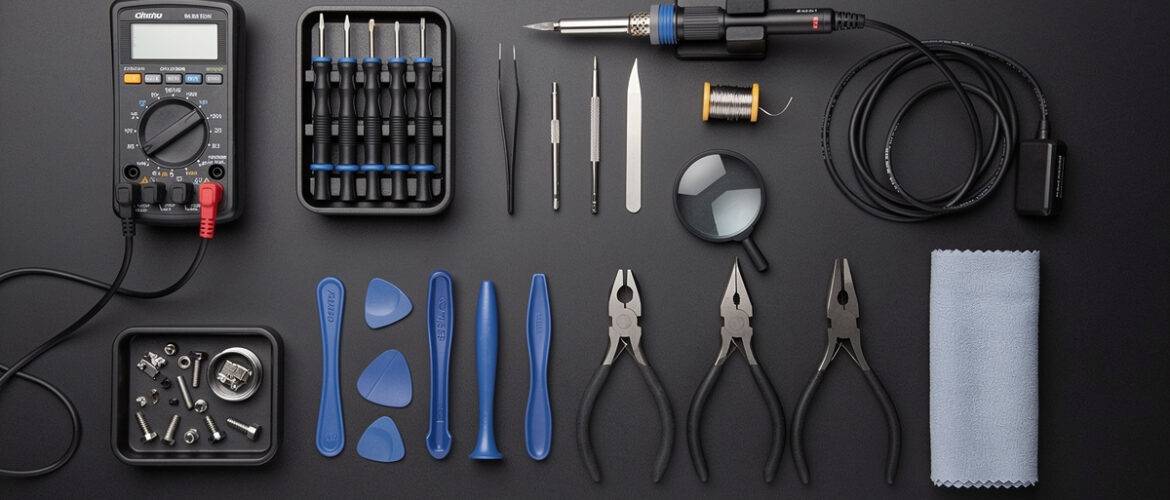
Most beginners waste $80–$120 on the wrong tools before they ever open a single phone — buying cheap kits that strip screws on the first job or skipping essentials that cause real damage. This free toolkit list cuts through the noise and gives you the exact gear you need to set up a capable, professional repair bench for under $200, with zero guesswork and zero fluff.
Comment TOOLKIT on our Instagram post to get this PDF sent straight to you — then come back here for the full breakdown below.
What You Get Inside
This is your complete beginner bench setup — every tool listed by name, with a short explanation of exactly why it earns a spot on your bench. Nothing here is filler. Every item was chosen because skipping it causes a specific, painful problem on real repair jobs.
The $200 Beginner Bench Toolkit — Full List
1. iFixit Pro Tech Toolkit ($69.99)
Why it’s here: This is the one kit that actually covers the full range of phone and laptop screws — Pentalobe, Tri-point, Torx, Phillips, and flat-head — all in one organized case. The driver bits are precision-machined so they seat properly in the screw head instead of slipping and stripping. If you buy one thing on this list, it’s this.
2. Hakko FX-888D Soldering Station ($99.00)
Why it’s here: Temperature-controlled soldering is non-negotiable the moment you move beyond screen swaps. The Hakko FX-888D holds a steady temperature — critical when you’re reflowing a connection near sensitive components. Cheap irons drift by 50°F or more, which means you’re either burning pads or not making a clean joint. This station lasts years and holds its value.
3. Kaisi 900ml Ultrasonic Cleaner ($45.99)
Why it’s here: Water-damaged boards need ultrasonic cleaning to get corrosion out of places a brush can’t reach. Even without water damage, this machine cleans flux residue off boards faster and more completely than any manual method. It pays for itself on the first liquid-damage job you take in.
4. Repairman LCD Suction Cup Handle Clamp ($12.99)
Why it’s here: Prying a screen open with just a pick is a great way to crack the display on your first attempt. A quality suction cup clamp holds the glass firmly while you work the opening picks around the frame — especially important on modern phones where adhesive is aggressive. Don’t skip this because it looks optional. It isn’t.
5. DANIU Plastic Opening Pry Tool Set — 30-Piece ($6.99)
Why it’s here: Metal spudgers gouge housings and scratch display connectors. Plastic picks flex and protect the phone while still giving you enough rigidity to pop clips and connectors safely. Keep a fresh set — once they’re nicked or bent, replace them. At $7 for 30, there’s no reason to work with damaged picks.
6. Kaisi Magnetic Project Mat ($9.99)
Why it’s here: Phone screws are tiny. One sneeze, one bump of the table, and a screw is gone — and a missing screw in a phone can mean a loose board that fails six months after the repair. A magnetic mat with printed phone diagrams means you park every screw in the exact position it came out of. This is the difference between a clean job and a callback.
7. 3M Anti-Static Wrist Strap ($7.99)
Why it’s here: Electrostatic discharge (ESD) is invisible and cumulative. You can damage a chip with static and not know it — the phone works when it leaves your bench and fails three weeks later. An anti-static strap costs $8 and eliminates that risk entirely. Always ground yourself before touching a board.
8. Amscope SE306R-PZ Stereo Microscope ($129.00) — Optional but Recommended
Why it’s here: This one pushes the budget if you buy everything else, so treat it as your next purchase. Micro-soldering and connector-pin inspection are nearly impossible to do accurately with the naked eye. If you plan to take in board-level repairs — which is where the real money is — a stereo microscope is mandatory. The Amscope SE306R-PZ gives you 10x–45x magnification at a beginner-accessible price.
9. Helping Hands Soldering Station with Clips ($14.99)
Why it’s here: You cannot hold a board, position a wire, and apply solder at the same time. A helping-hands clamp holds the board at the angle you need so both hands stay free for the iron and solder. This is not optional for any job involving heat.
10. 99% Isopropyl Alcohol — 16oz ($12.99)
Why it’s here: 70% rubbing alcohol from the drugstore leaves a residue and can damage display coatings. 99% isopropyl evaporates clean and fast — you need it for cleaning adhesive residue, flux, and corrosion. Buy the 99% version specifically. Keep a bottle on your bench at all times.
11. Tweezerman or Engineer Precision Tweezers Set ($11.99)
Why it’s here: Placing flex cable connectors, lifting tiny ribbon cables, and positioning screws into tight housings all require precision tweezers. Curved, straight, and angled tips cover every scenario. Cheap tweezers spring and drop connectors into the worst possible spots inside a phone.
12. Phone Holder / Repair Clamp Stand ($16.99)
Why it’s here: Working on a phone held flat on a mat is hard on your neck and gives you bad angles. A repair clamp stand holds the phone at a comfortable working angle and frees both hands. Simple upgrade, big difference in comfort and precision on a long repair day.
Total Approximate Cost
- Core essentials (without microscope): ~$149–$160
- Full list including microscope: ~$270–$290
- Starting with just the must-haves (items 1, 4, 5, 6, 7, 9, 10, 11): ~$130
Pro tip: Start with the core essentials, take your first two or three paid jobs, then use that money to add the soldering station and microscope. Your bench grows with your skills and your income — you don’t have to spend it all at once.
Where to Buy
- iFixit.com — for the Pro Tech Toolkit and opening tools
- Amazon — for everything else; all items listed above are available with Prime shipping
- eBay — for the Amscope microscope, where refurbished units often save you $40–$50
Want to Go Deeper?
This toolkit list gets your bench ready — the Phone Repair Course Launch Kit 30 Days shows you exactly what to do once you’re sitting at it, from your first screen swap to booking your first paying customer in 30 days or less.
→ Enroll in Phone Repair Course Launch Kit 30 Days Free Trial
📥 Download Your Free PDF
Download the PDF version and keep it taped above your bench so every tool is exactly where it should be before you touch your first phone.
Free account required · 30 seconds to sign up · Download instantly
Leave a Reply
You must be logged in to post a comment.